05 — Redesign
Quick Start, Canvas and Playground — rebuilt
The audit's fixes, designed and then built: 32 screens — Quick Start, Canvas and Playground, then sharing, settings and comments — telling one story: the same 15-second mug ad, the same cast, the same credit numbers. Every thumbnail below opens the live screen in that exact state.
05 — Redesign
Quick Start, redesigned#
From idea to finished film in one studio: pick a look, watch the draft arrive, review the storyboard, fix one shot, see the price, render, then watch and share. Seven screens, same 15-second mug ad as the audit, real frames from the account.
What changed, by audit marker
- A05·2 silent spend→ every draft and render shows its cost and the balance moves in the top bar.
- A05·4 / A06 one-click 529→ price on the button plus a line-item sheet with a cheaper test shot.
- A05·3 'the The Potter'→ fixed.
- A07 tiny player, download only→ full player, per-shot redo, share for review.
- B06 empty timeline→ the timeline is always there.
- New→ mark shots good before rendering, failed shots refunded, close the tab and get an email.
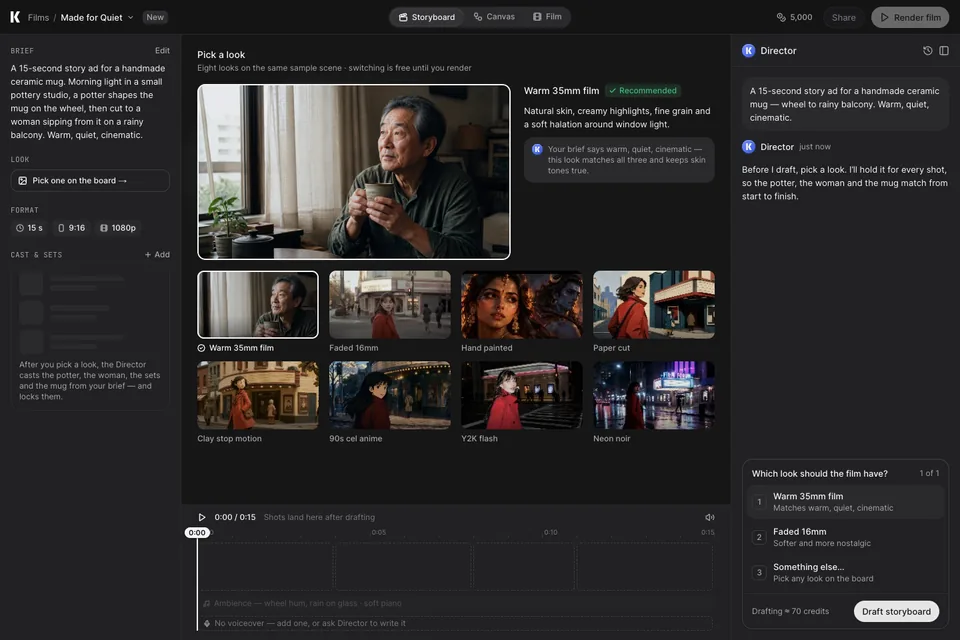 K·01Open live screen
Pick a look
One question before any credits are spent. Looks are compared on one scene; switching is free until you render.
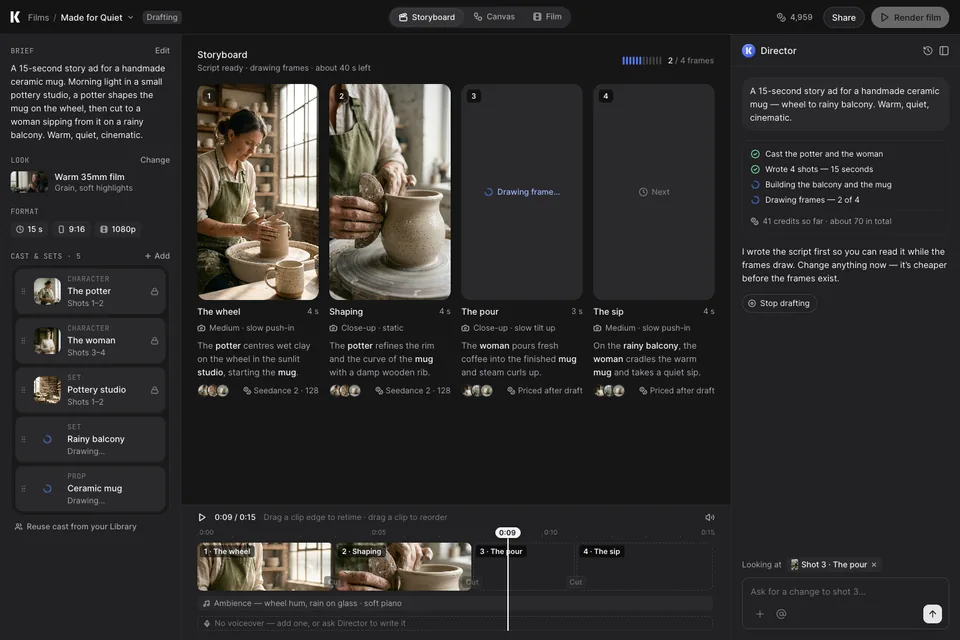 K·02Open live screen
Drafting
The script lands first and frames fill in, so you can read and redirect early. Spend so far is visible, and you can stop.
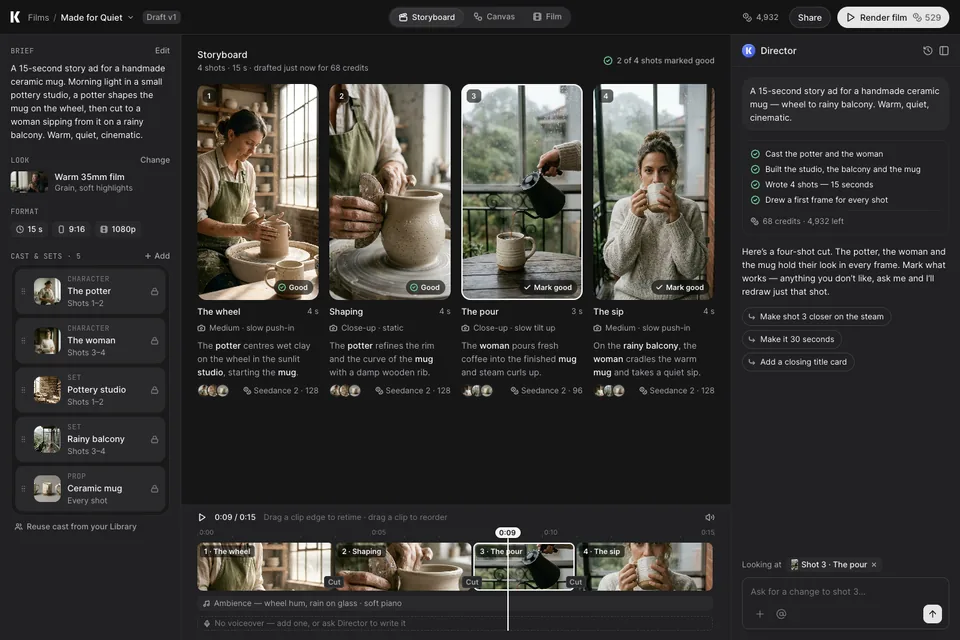 K·03Open live screen
Storyboard review
The hub. Locked cast and sets, four shots with camera and cost, a real timeline, and "Mark good" per shot before you pay.
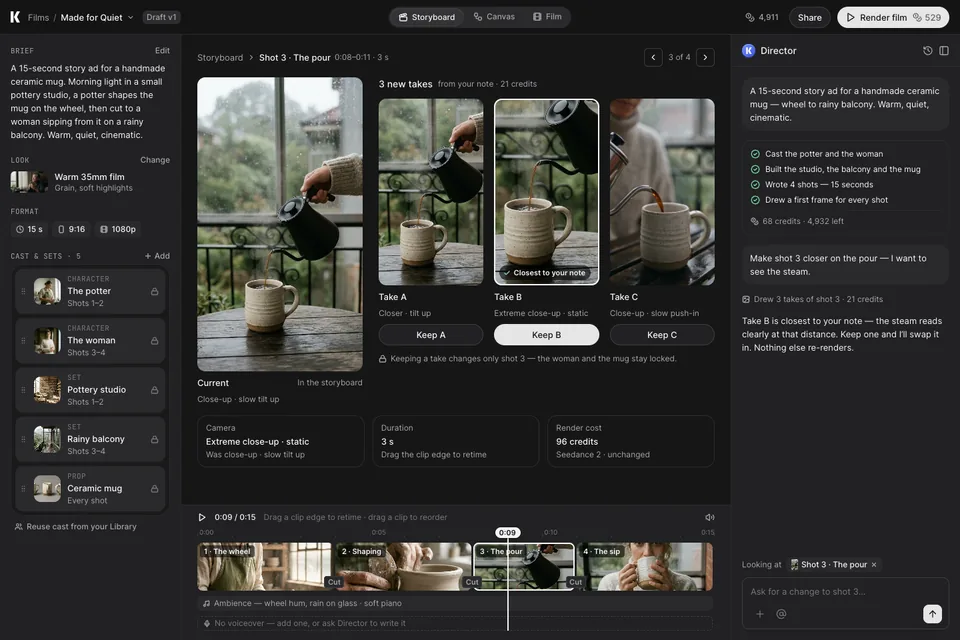 K·04Open live screen
Fix one shot
A note becomes three takes beside the current frame. Keeping one changes only that shot — nothing else re-renders.
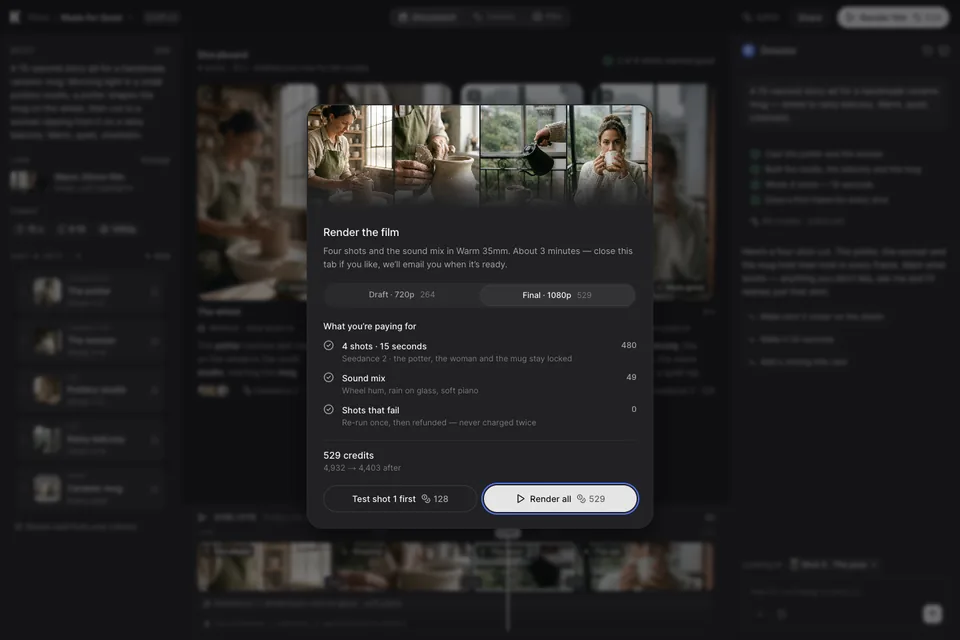 K·05Open live screen
Price before you pay
Draft or final quality, cost per shot and sound, balance after, refund rule — and a cheaper "test shot 1 first".
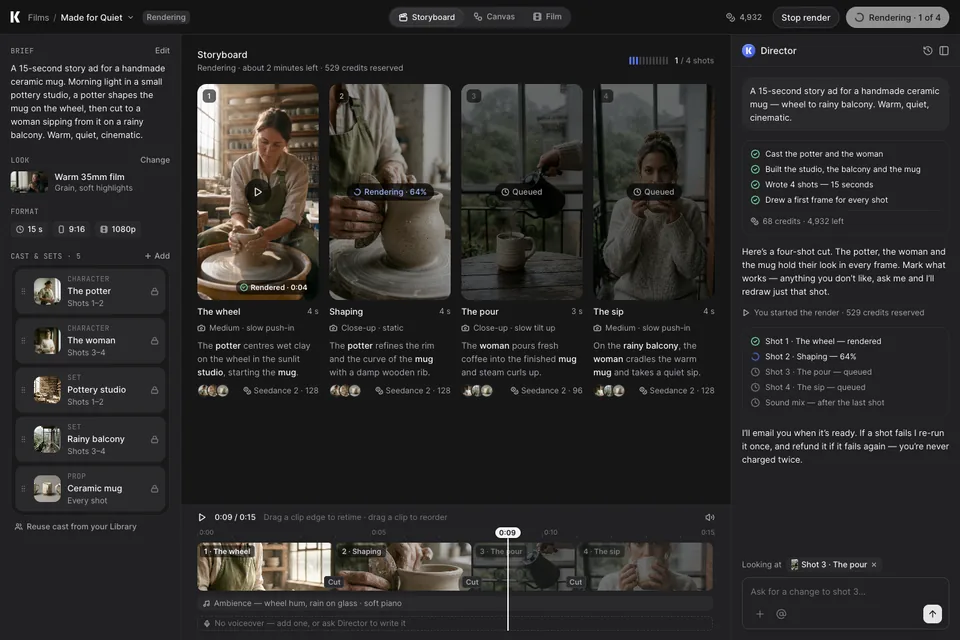 K·06Open live screen
Rendering
Shot-by-shot status on the board and in the Director. Stop render, or close the tab and get an email.
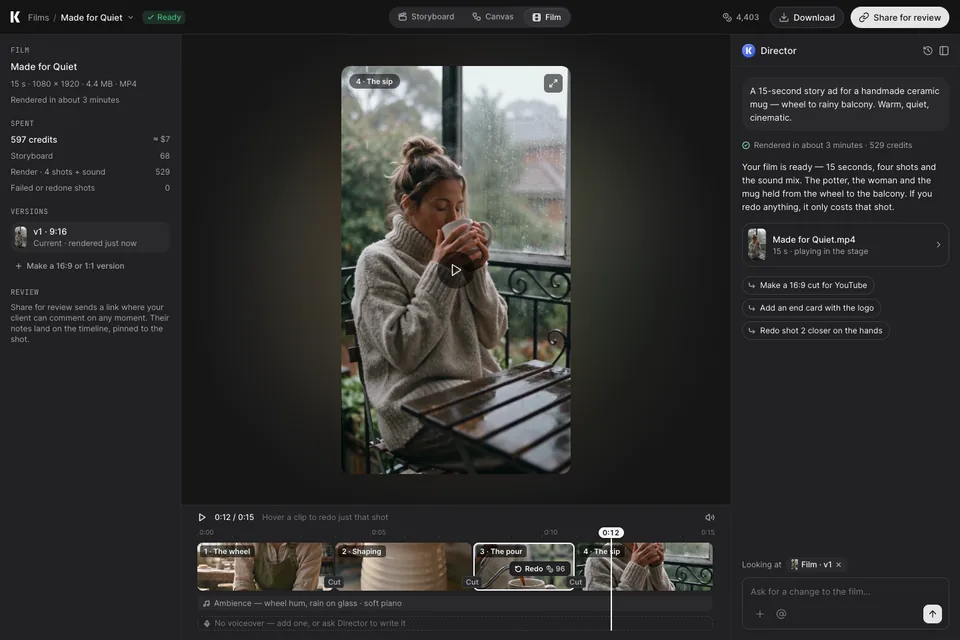 K·07Open live screen
Film
The film is the hero. Hover any clip to redo just that shot; versions, spend and share-for-review on the left.
06 — Redesign
Canvas, redesigned#
The node graph for people who want control: one home for every film, a canvas that starts work instead of saying it’s empty, a graph you can read, adding nodes that fit, inspecting with cost and impact, and changing something upstream without paying for everything by accident. Same film, same numbers as the Quick Start screens.
What changed, by audit marker
- B01 one film, two homes→ Films is the single home; Storyboard, Canvas and Film are views of the same film.
- B01 'Untitled' black tiles→ status, length and spend on every card.
- B02 'This shared canvas is empty'→ private by default, three ways in.
- B03 26 nodes + Mosquito→ add from a port, only what fits, costs shown.
- B04 generic agent→ it opens with a question.
- B05 unreadable graph, blind Run→ lanes, outline, minimap, priced runs.
- B06 empty timeline→ the cut is always there.
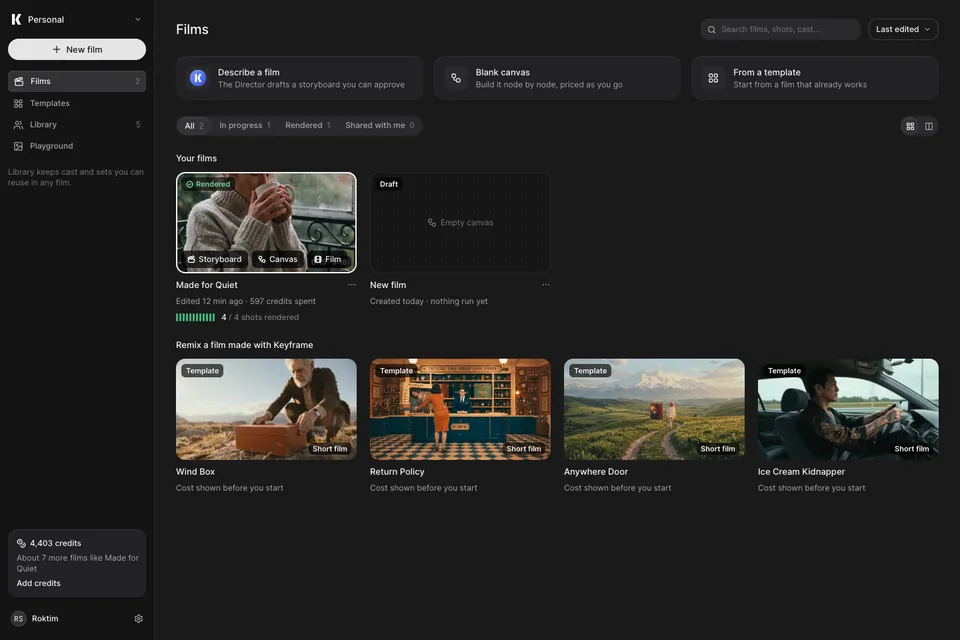 C·01Open live screen
Films
One home for every film. Status, length and spend on every card; hover to open it as Storyboard, Canvas or Film.
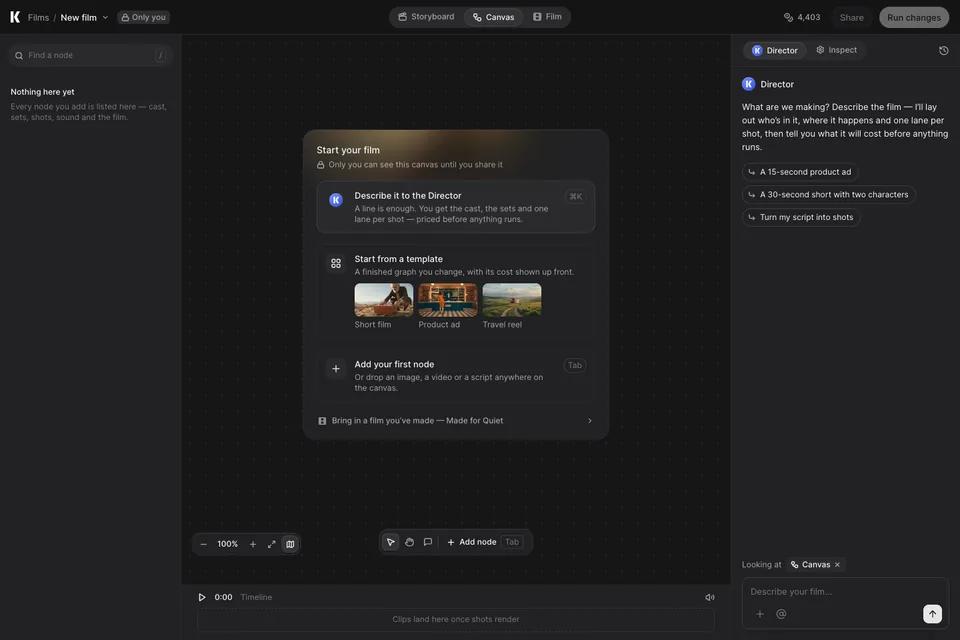 C·02Open live screen
Start a canvas
Private by default, and three ways in: describe it to the Director, start from a template, or add a node.
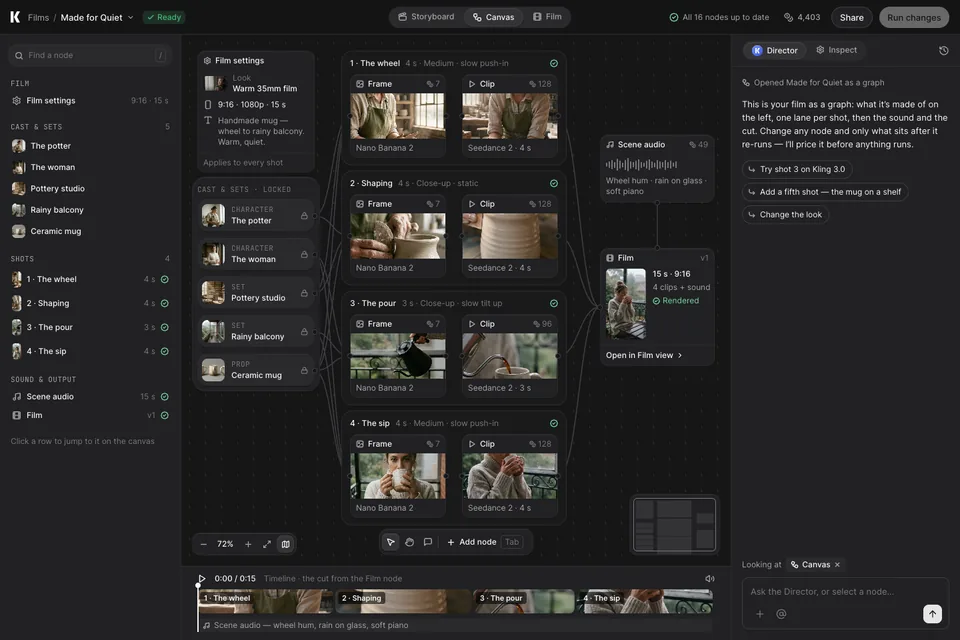 C·03Open live screen
The film as a graph
Locked cast and sets, one lane per shot, then sound and the cut. Outline, minimap and timeline keep it navigable.
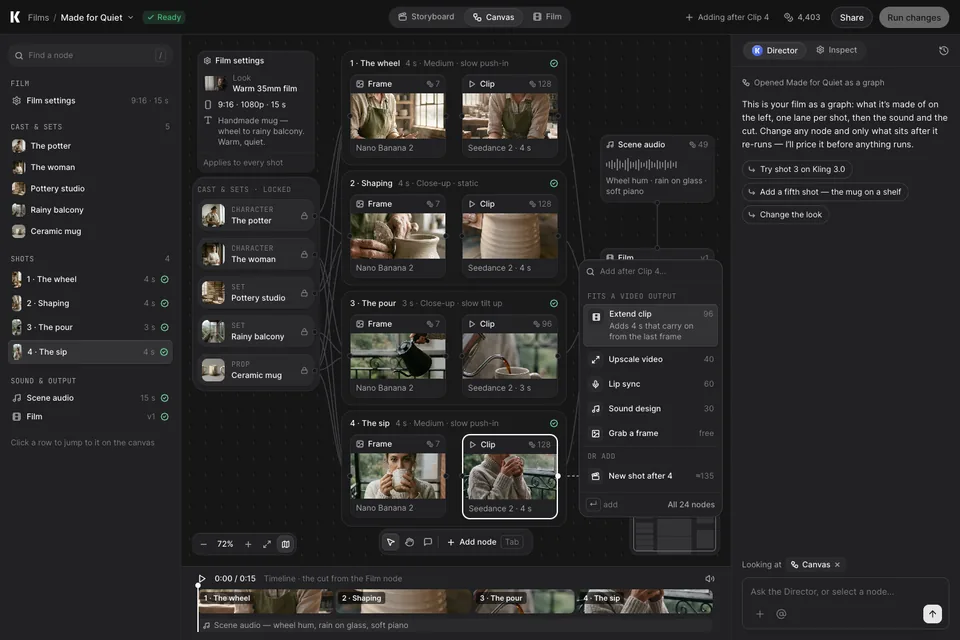 C·04Open live screen
Add a node
Drag from Clip 4: only nodes that fit a video output, each with its cost — or add a whole new shot.
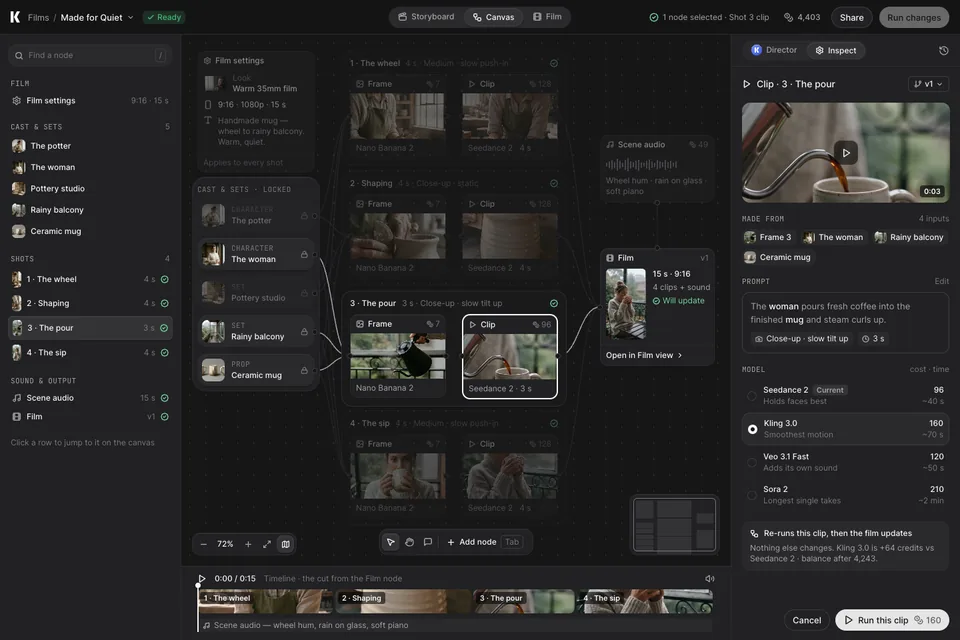 C·05Open live screen
Inspect a node
Shot 3’s inputs light up, the rest dims. Pick a model by cost and time; see exactly what re-runs.
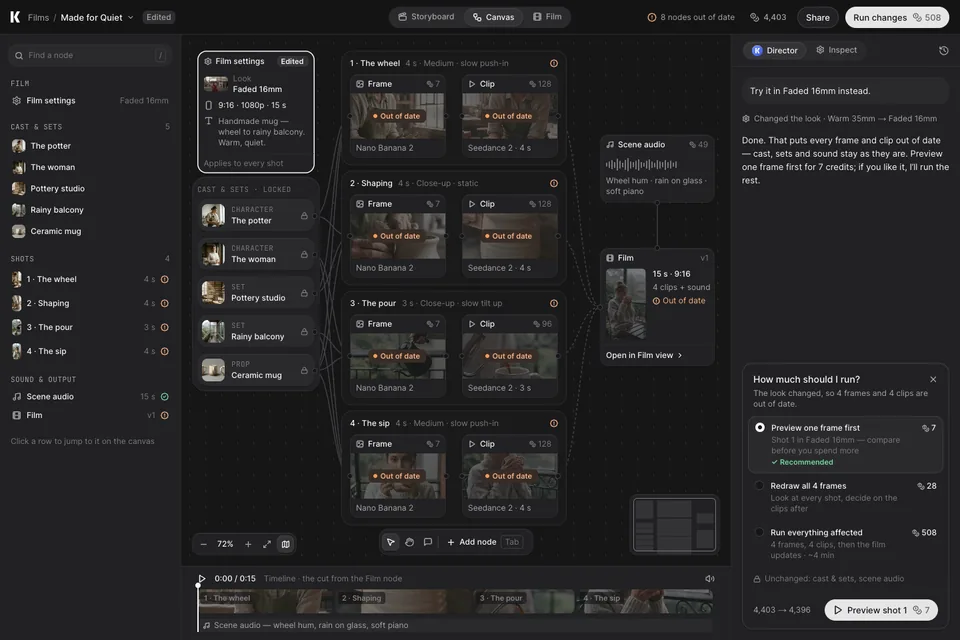 C·06Open live screen
Change the look
Every frame and clip goes out of date. The Director offers the cheapest path first: one frame for 7, not 508.
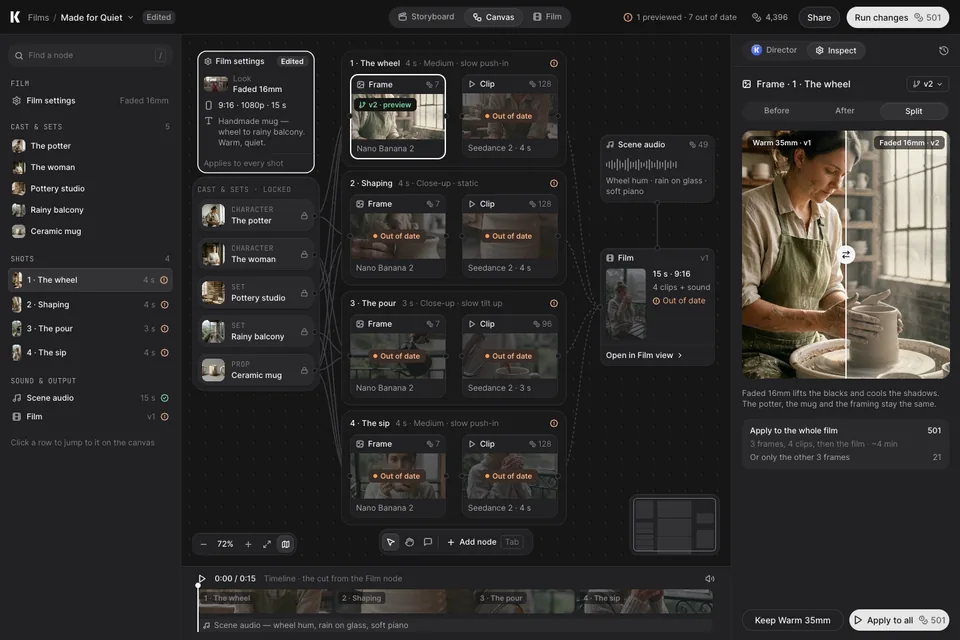 C·07Open live screen
Compare, then apply
The previewed frame next to the original. Keep Warm 35mm, or apply Faded 16mm to the rest for 501.
Patterns borrowed, via Mobbin
- WRITEROutline + minimap + zoom for big graphsC·03
- ElevenLabs FlowsDrag from a port → only nodes that fit that outputC·04
- falSearchable palette with intent filters and keyboard hintsC·04
- n8nInput · settings · output around one node, with “Execute step”C·05
- Customer.ioBefore / After / Side-by-side compare before you saveC·07
- RiversideDark project library with quick-start tiles on topC·01
07 — Redesign
Playground, redesigned#
Quick stills and clips that don’t stay stranded: your cast one @ away, every run readable with its price, a model picker that says what each model is for, an honest switch to video — and a straight path from a good still into the film. Same mug, same woman, same numbers as chapters 05 and 06.
What changed, by audit marker
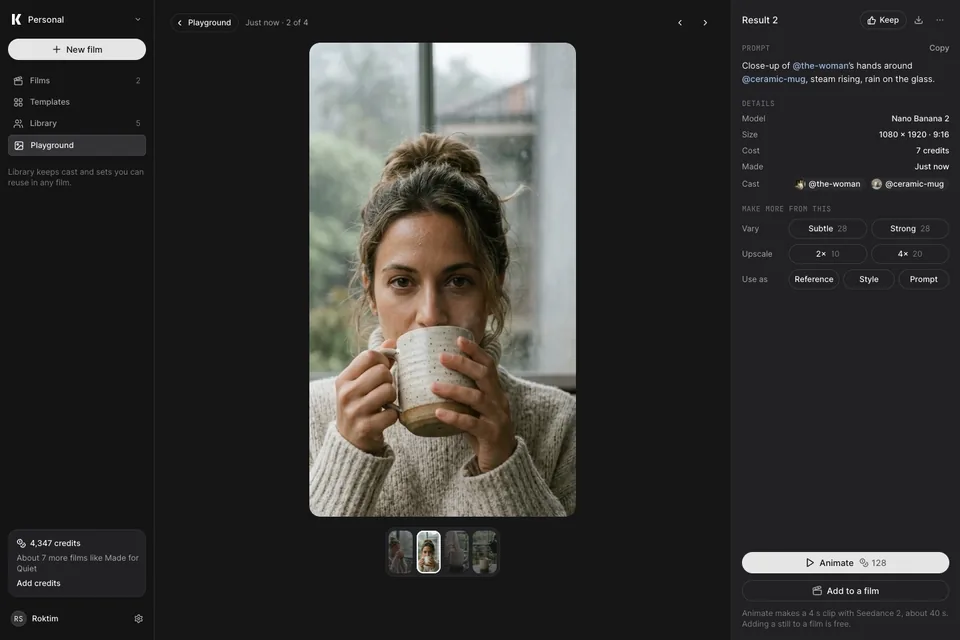
- C01·2 your result is the smallest image→ large results and a full detail view.
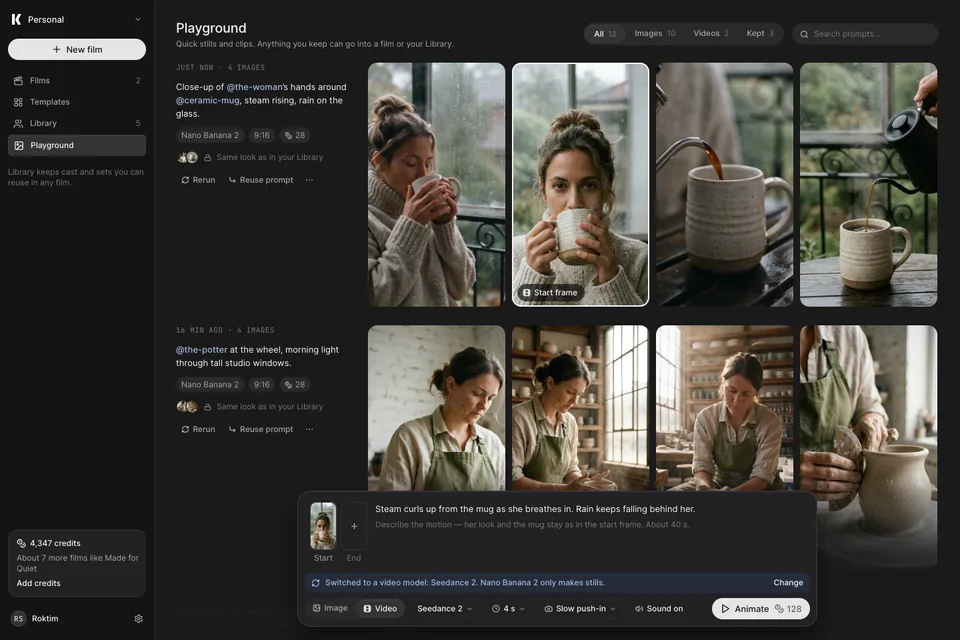
- C01·3 the mode switch silently swaps settings→ a labelled switch and a note naming the new model.
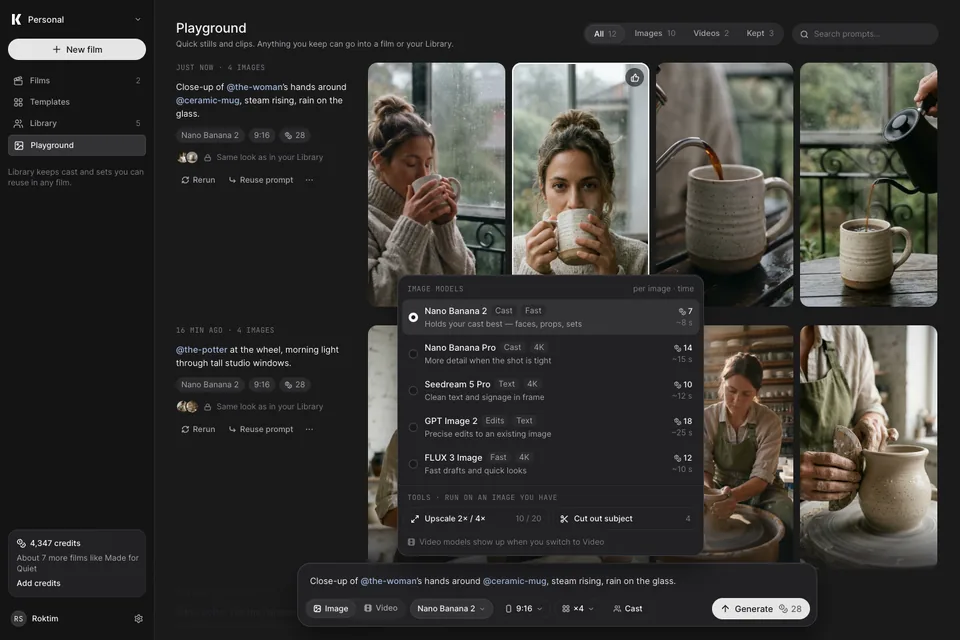
- C02 a model list without help→ purpose, strengths, price and time per model; upscale and cut-out moved to Tools.
- C03 cost only on hover→ the price is on every Generate, Vary, Upscale and Animate.
- New→ Playground → film (P·07).
Prices other than Nano Banana 2 (7) and Seedance 2 (128) are placeholders for layout.
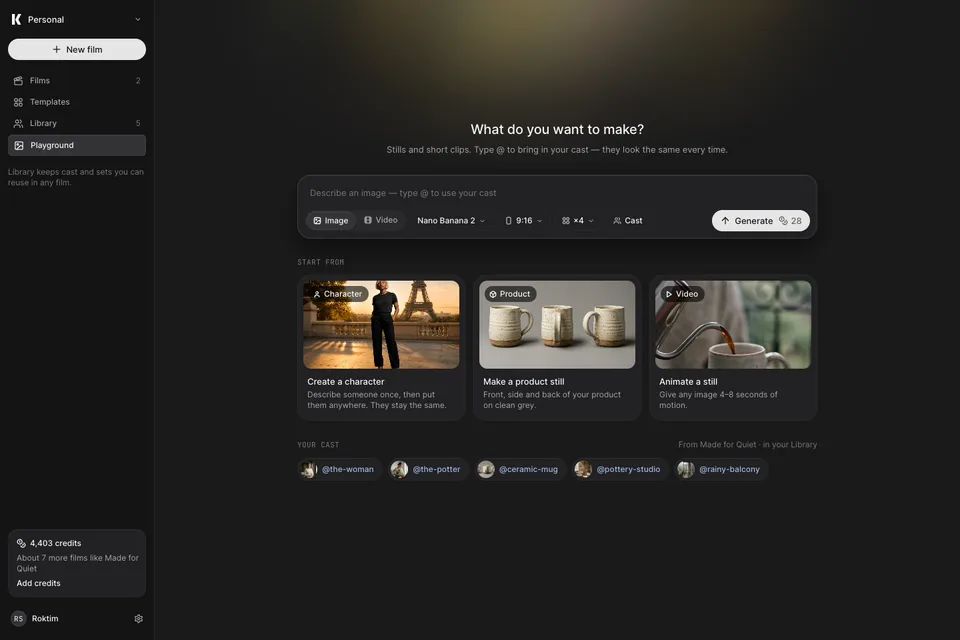 P·01Open live screen
First visit
One question, the prompt dock, three real ways in, and your cast one @ away. A start moment, so it gets soft light.
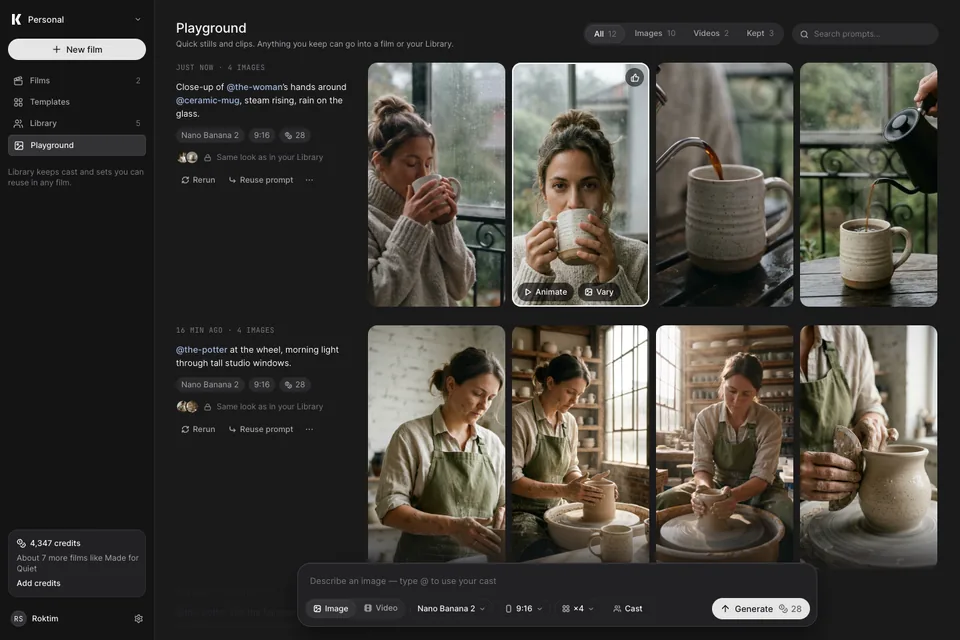 P·02Open live screen
Every run, grouped
Each run with its prompt, model, cost and cast. Results are large; hover to animate or vary.
 P·03Open live screen
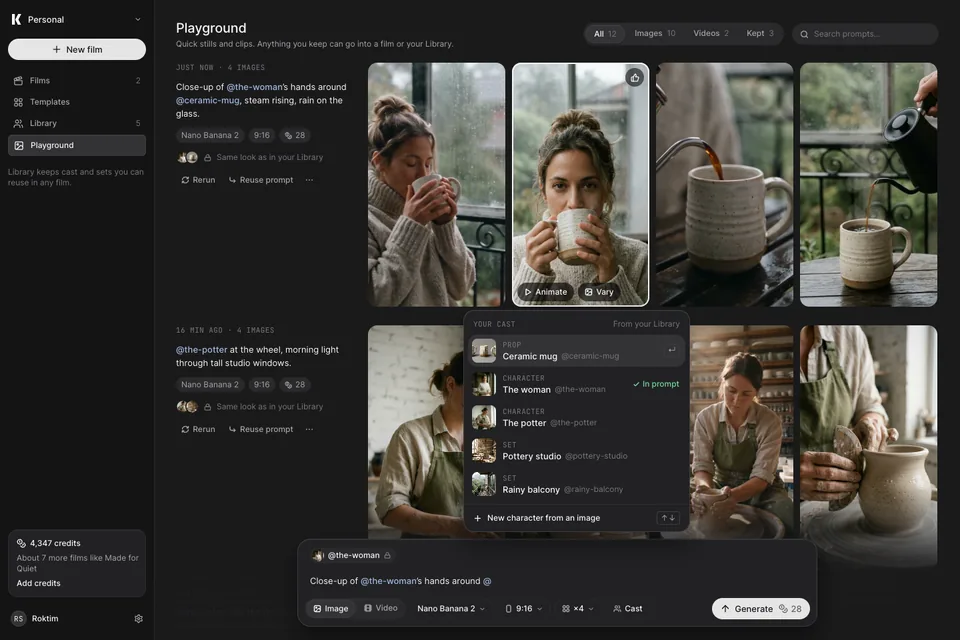
Type @
Your Library’s characters, sets and props as you type — each locked to how it looks.
 P·04Open live screen
Pick a model
What each model is for, what it’s good at, its price and time. Tools sit apart from models.
 P·05Open live screen
One result
Big and neutral. Vary, upscale or reuse with the price on each; Animate and Add to a film are the exits.
 P·06Open live screen
Animate
The switch to video is said out loud. Start and end frames, motion, length, sound — 128 credits, about 40 s.
 P·07Open live screen
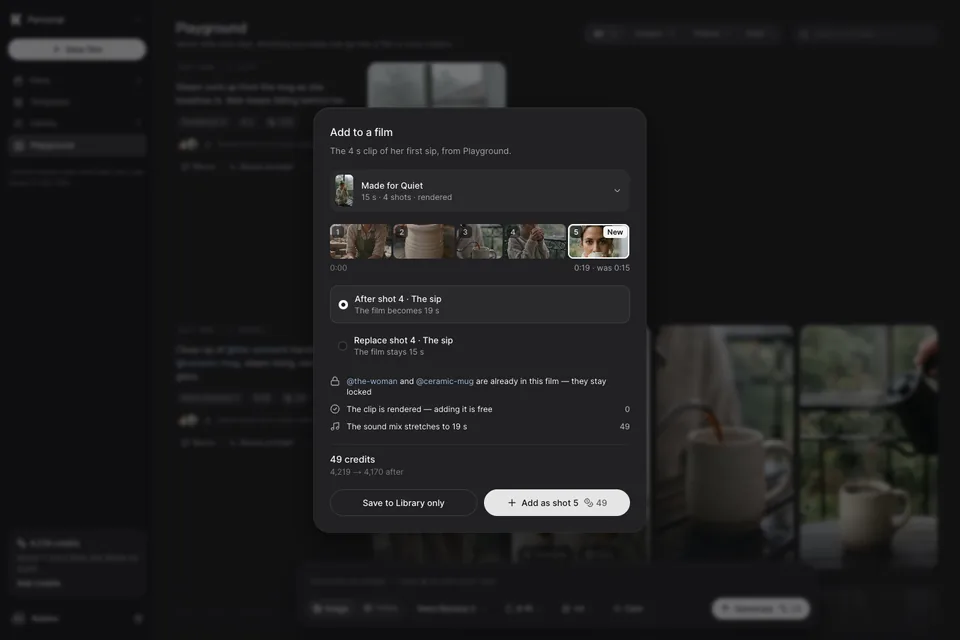
Add to a film
Pick the film and the spot. The cast is already there and the clip is free; only the sound mix re-times (49).
Patterns borrowed, via Mobbin
- MidjourneyEach run’s prompt and settings sit beside its grid, with Rerun and UseP·02
- MagnificCharacters, locations and looks as @references you pick from a libraryP·03
- fal“Type @alex_smith in any prompt to load this character”P·01 · P·03
- LeonardoEvery model with a one-line purpose and capability tagsP·04
- MidjourneyCreation actions grouped: Vary, Upscale, Remix, UseP·05
- KreaStart frame and end frame as chips in the video promptP·06
Style direction
Softer, warmer, more tactile#
Three references you liked, measured rather than eyeballed. Applied as a re-tune of the Keyframe Dark mode plus two effect styles, so every screen in chapters 05 and 06 picked it up — the layouts and flows did not change.
- →Warm charcoal greys instead of cold near-black
- →Raised controls: lighter fill + 1px lighter border on the active item
- →Dot + tint status tags — colour without shouting
- →Segmented tick progress — used for render and draft progress
- →A modal that leads with an image — the render sheet now shows the four frames
- →Stacked layer cards — cast & sets is now a stack you can reorder
- →Mono uppercase labels above plain-language text
- →Pill buttons: muted Close, near-white primary
- →Big radii: 20px containers, 12px rows, round icon buttons
- →Blurred, dimmed backdrop rather than a flat scrim
- →Single cool accent for “agent” (#4F72F0) replaces the purple
Light only where nobody is judging colour
- →Moments, not workspaces: the start card (C·02), the look picker (K·01) and the finished film (K·07). The library and the render dialog stay clean.
- →Never on the storyboard, the graph, the timeline, the inspector or a compare view — those stay neutral grey so frames are judged true.
- →Where it can, the light comes from the user’s own frames (ambient mode): K·01 from the chosen look, K·07 from the playing frame.
- →Mood photos only in start moments, behind no text, faded into the host colour.
- →One component, “Keyframe / Ambient light”: image + layer blur (56–120) faded by an alpha mask (Top, Corner or Center falloff) — no opaque fade layer, so it never shows an edge on any background.
Corners nest, and each role has one radius
- →Tight nesting (padding ≤ 8): inner radius = outer radius − padding. Tabs, segmented controls, the cast stack, timeline clip labels.
- →Loose nesting (padding > 8): each element keeps its role radius, and a child is never rounder than its parent.
- →Roles: 6 tags & keys · 8–10 thumbs & icon tiles · 12 rows & canvas nodes · 14–16 cards & frames · 20 panels & stacks · 24 modals · pills for buttons and segmented controls.
- →Media flush to a clipped edge gets 0 — the container’s clip makes the curve (K·05 header frames).
- →Audit result: 210 mismatched pairs → 0 across the 14 screens.
One playhead, in design and in code
One playhead for every timeline — “Keyframe / Playhead”: a timecode pill on the ruler and a 2px line through the tracks (Compact variant: an 8px knob for timelines without a ruler). The same component ships in code, so design and build can't drift.
Keyframe Dark — before → after
Design to code
Built the same as it was drawn#
The screens in this site are a Next.js build of the Figma frames, not mock-ups of them. The Keyframe Dark tokens, text styles and effect styles were exported from the Figma variable collection; the icons are the kit's own glyphs; the typeface is the Inter build Figma renders with. Each screen was compared against its Figma frame at 1440 × 960 and corrected until only font antialiasing differed.
Try it